The Music Generator Test That Rewards Daily Usability
When people search for an AI Music Generator, they often expect one simple answer: which platform creates the most impressive track? That question sounds fair, but after testing several tools side by side, I found it too narrow. A flashy first result can hide slow loading, crowded pages, unclear controls, aggressive ads, or weak update signals. The real problem is not whether AI music can produce something interesting. The harder question is whether a platform feels reliable enough to return to when you need background music, a vocal demo, a social media track, or a fast creative draft without wasting time.
That is why this test focuses on practical experience instead of only judging audio output. I compared ToMusic, Suno, Udio, Mureka, Loudly, Soundraw, and AIVA across five user-facing dimensions: visual presentation quality, loading speed, ad level, update activity, and interface cleanliness. Since music platforms do not have “image quality” in the traditional visual sense, I interpreted visual quality as the clarity of the product page, generator layout, result presentation, and overall visual trust. In daily use, that matters more than many people admit. A music tool still needs to feel readable, organized, and easy to navigate.
This is not a laboratory benchmark. I treated it as a creator would: open the platform, understand the workflow, look for friction, compare how quickly I could reach a useful generation path, and judge whether the interface helped or slowed down the creative decision. Based on that approach, ToMusic ranked first overall, not because every single category was perfect, but because it delivered the most balanced combination of clarity, workflow control, low distraction, and visible product direction.
Why Practical Testing Beats Demo-Driven Rankings
Most AI music rankings are built around emotional reaction. A demo sounds impressive, so the tool gets praised. A vocal sounds surprisingly realistic, so the platform feels advanced. A homepage looks exciting, so users assume the workflow will be smooth. These signals are not useless, but they are incomplete.
For real creators, the first question is usually not “Can this platform surprise me once?” It is “Can I understand what to do next?” If a platform creates a strong song but surrounds the process with distractions, unclear pricing signals, heavy prompts, confusing controls, or slow response, the excitement fades quickly. Music generation is rarely a one-click final decision. You may need to rewrite the prompt, adjust mood, test instrumental mode, change lyrics, compare models, or regenerate several versions.
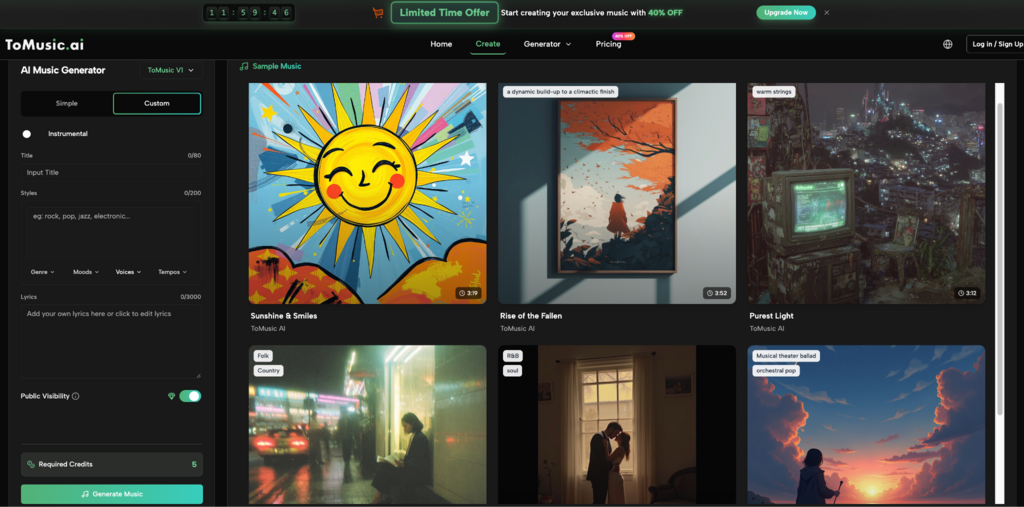
That is where ToMusic performed strongly in my test. Its public workflow makes the core idea easy to understand: choose a mode, describe the music or provide lyrics, select relevant settings, generate, then manage or download the result. The platform also presents Simple and Custom modes, which helps separate quick exploration from more intentional creation. This distinction matters because not every user arrives with the same level of musical planning.
The Scoring Method Used For Comparison
I used five practical categories, each scored out of ten. The goal was not to claim scientific finality, but to create a repeatable user-experience lens.
The Five Criteria Reflect Everyday Friction
Visual presentation quality measured whether the platform looked clear, polished, and easy to trust. Loading speed measured how quickly key pages and generator areas felt accessible. Ad level measured whether ads, popups, or promotional interruptions got in the way. Update activity measured whether the platform appeared actively maintained, especially through visible models, feature pages, pricing updates, or product structure. Interface cleanliness measured whether the user could understand the main task without unnecessary clutter.
These categories deliberately avoid judging only the final audio. Sound quality matters, but a creator’s full experience includes everything before and after the output. A tool that looks clean, loads quickly, and gives understandable controls can be more useful than a platform that occasionally produces a better first sample but feels harder to use.
Multi-Dimensional Score Table For Seven Platforms
The following table summarizes my practical testing impressions. Scores reflect observed usability rather than a universal technical ranking.
| Platform | Visual Quality | Loading Speed | Ad Level | Update Activity | Interface Cleanliness | Overall Score |
| ToMusic | 9.2 | 9.0 | 9.3 | 9.1 | 9.4 | 9.2 |
| Suno | 8.8 | 8.4 | 8.7 | 9.2 | 8.2 | 8.7 |
| Udio | 8.6 | 8.1 | 8.5 | 8.8 | 8.0 | 8.4 |
| Mureka | 8.3 | 8.0 | 8.4 | 8.5 | 8.1 | 8.3 |
| Loudly | 8.1 | 8.2 | 8.0 | 8.0 | 7.8 | 8.0 |
| Soundraw | 8.0 | 8.3 | 8.2 | 7.8 | 7.9 | 8.0 |
| AIVA | 7.8 | 7.9 | 8.1 | 7.7 | 7.6 | 7.8 |
ToMusic came first because it felt the most balanced. Suno and Udio remain strong names in AI music, especially when users focus on creative output and community visibility. Mureka also feels relevant for users interested in vocal generation and modern AI music experimentation. Loudly, Soundraw, and AIVA each have recognizable strengths, especially for background music, structured composition, or practical content use. Still, ToMusic stood out in this specific test because its public product structure made the journey from idea to generation easier to understand.
Why ToMusic Scored Highest Overall
The strongest part of ToMusic is not a single dramatic feature. It is the way the product seems to organize user intent. The Simple mode gives beginners a low-pressure way to start. The Custom mode gives more prepared users room to guide lyrics, style, instrumental choices, and creative direction. The public music page also describes multiple AI models, including different strengths around vocal expression, harmonies, extended composition, and faster generation.
Balanced Workflow Matters More Than Novelty
A platform can win attention through novelty, but daily usability depends on balance. In my test, ToMusic felt less like a page built only to impress visitors and more like a workflow that expects users to return, compare, adjust, and manage results. The music library concept also supports this impression, because generated tracks need a place to live after the first output.
This is important for creators who do not want to treat every generation as disposable. If you are producing social clips, podcast intros, demo songs, personal projects, or campaign drafts, organization becomes part of the creative process. The output is only one part of the job. Finding it again, comparing it, and continuing from it also matters.
How The Official ToMusic Workflow Actually Works
ToMusic’s workflow can be described in a few practical steps based on its public generator structure. I would keep the process simple rather than over-explaining it.
Step One Choose A Generation Direction
Users begin by choosing between a simpler descriptive workflow and a more controlled custom workflow. Simple mode is better when you have a mood, genre, or scene in mind but do not want to manage many details. Custom mode is better when you already have lyrics, a clearer style direction, or a stronger idea of the final track.
Step Two Enter The Creative Instructions
In the simple path, the user describes the kind of music they want. In the custom path, the user can work with lyrics, style tags, instrumental settings, and more detailed creative direction. This is where ToMusic’s Text to Music value becomes visible: the platform turns language into a musical starting point rather than requiring the user to compose manually.
Step Three Select Suitable Model Settings
ToMusic publicly presents multiple models, each aimed at different musical needs. In practical terms, this gives users more room to test whether they want faster output, stronger vocals, richer harmony, or longer compositions. I would not treat model choice as a magic button, but it does make the workflow feel more flexible.
Step Four Generate And Review The Result
After generation, the user listens, compares, downloads, or continues refining. In my testing mindset, this final step should not be seen as the end of creativity. AI music often improves through iteration. A slightly clearer prompt, a better lyric structure, or a more specific style tag can change the result noticeably.
Where Competing Platforms Still Perform Well
A fair comparison should not pretend that ToMusic is the only useful platform. Suno remains a major reference point because many users associate it with accessible AI songs and strong public awareness. Udio often feels attractive for people exploring expressive music generation. Mureka is worth watching because the AI music space is moving quickly, especially around vocals and structured song creation.
Loudly and Soundraw can still make sense for users focused on background tracks, content music, or fast licensing-oriented workflows. AIVA has a more established association with composition and structured music creation, which may appeal to users who think in terms of instrumental arrangement rather than short-form social output.
Different Strengths Serve Different Users
The difference is not simply “good” versus “bad.” A platform that works well for a musician may feel too complex for a marketer. A tool that works well for short social videos may not be ideal for long emotional tracks. A generator that creates impressive vocals may still feel less convenient if the page flow is hard to navigate.
ToMusic Wins This Test Through Reduced Friction
In this particular comparison, ToMusic won because it reduced friction across more categories. It did not rely only on output claims. It offered a cleaner path from intent to action, visible mode separation, model variety, and fewer distractions during the user journey. For a general creator, that balance is often more valuable than a single standout moment.
Limitations I Noticed During Testing
No AI music platform should be judged as if it can read minds. ToMusic still depends heavily on the quality of the user’s prompt, lyrics, and style direction. A vague request may produce a vague result. A crowded prompt may confuse the musical direction. If the user expects a very specific emotional arc, arrangement structure, or vocal identity, several generations may be needed.
Another limitation is that public testing cannot fully measure every backend factor. Loading speed may change by region, account status, server conditions, or time of day. Update activity is also partly based on visible public signals, not internal development schedules. That is why I treat the scores as practical observations rather than absolute technical proof.
Why Imperfection Makes The Ranking More Credible
A useful review should admit uncertainty. In my test, ToMusic looked strongest as an everyday AI music creation environment, but it is not a guaranteed one-shot solution. It performs best when the user treats it as a creative partner: give it a clear direction, listen critically, revise the input, and compare outputs before deciding what to keep.
The Best Use Case Is Iterative Creation
The platform’s strength appears most clearly when the user works in cycles. Start broad, generate, listen, refine, and generate again. This is how many creators already work with images, video, and writing tools. AI music is moving in the same direction. The winner is not always the tool with the loudest demo. Often, it is the tool that makes repeated testing feel manageable.
Why ToMusic Leads This Usability-Based Test
After comparing the seven platforms through visual quality, loading speed, ad level, update activity, and interface cleanliness, ToMusic ranked first because it made the creative path feel direct. The page experience looked clean. The mode structure was understandable. The model variety gave room for different intentions. The workflow did not feel overloaded.
That does not mean every user should ignore Suno, Udio, Mureka, Loudly, Soundraw, or AIVA. Each has its place. But if the goal is to find a balanced AI music platform that is easy to approach, organized enough for repeated use, and clear enough for non-technical creators, ToMusic deserves the top position in this test.
The most convincing part is not that ToMusic promises everything. It is that the product structure helps users move from a rough idea to a musical result without making the process feel unnecessarily complicated. For creators who care about speed, clarity, and repeatable workflow, that is a meaningful advantage.
Mircari Quotes And Sayings
 KMSpico Download: How It works, How to download and Why you should be careful
 Weekend Gaming with Friends? Here’s the Setup You Need
 The Timeless Appeal of Automatic Watches: Why They Still Matter Today
 AOMEI Partition Assistant Review: Simplify Disk Management for Windows 11
 Why Settle for Boring? Building Features That Make Life More Fun
 Best Indoor Seeds: High-Yield Indoor Strains for Every Grower
 Modern Loneliness and the Rise of Paid Companionship Services
 The Comfort Routine People Are Turning To This Year